Showing posts with label Morris. Show all posts
27 July 2016
Wedding Wednesday - Ansley & Pressley (1848)
Georgia, Habersham County.
To Any Judge, Justice of the Inferior Court, Justice of the Peace, or Minister of The Gospel -
You are hereby authorized to join in the holy state of Matrimony, Raiford Ansley and Miss Abigail Pressley according to the Constitution and Laws of this State; and for so doing this shall be your sufficient License.
Given under my hand, this 29th day of January 1848
s/ Phiip Martin, C.C.O
_______________________
Georgia, Habersham County.
I certify that the above named Parties were duly joined in Matrimony, by me, this 3 day of Febrauary 1848
s/ Boling G. Morris J.P.
Recorded 8th March 1848
s/ Philip Martin, C.C.O
*Habersham County, Georgia Marriages Bk B (1841-1874). Pg. 52. Georgia State Archives, Box 252, Drawer 19
25 July 2016
Monday Musings
This weeks postings will be primarily focused on Thomas Ansley (1775-1838). Born in New Jersey, the son of William Ansley (ca1700-1773) and his wife, Rebecca (ca1720-ca1750). I've got tons of stuff I want to chase on this line but there are only so many hours in the day.
While I was at the Georgia Archives I found quite a few very early "colonial" records on Thomas and I am going to share them here with those who may be interested. Other records I had hoped to locate just were not to be found. So I will share the things I did find.
IF you are by chance related to the Ansley family, I'd love to hear from you. If you see a document here that you want to use in your family file, by all means let me know and I'll send you one of the scans I have along with the source that goes with it. In exchange I'd like to see how you are related to the Ansley's. : ) Keep in mind that not all of the documents you will see posted this week have been transcribed YET.
Thomas Ansley and his wife, Rebecca "Widow Harrison" Cocke, are my sixth great grandparents.
Happy Researching!
Karen
11 November 2015
Not Your Average Bump On A LOG (Reunion)
It seems every one has an opinion, some people love them, some people have no use for them. In my case I can't imagine not having them. Reunion calls them "LOGS", some programs call them "To Do" lists. Whatever they are called, I love them!
Switching from Legacy to Reunion, which was one of the hardest decisions I've ever had to make with my genealogy, took a bit of a learning curve. No lie, pure honesty, and it took some work to get my genealogy to be workable. BUT, I do believe it was a very good decision. Now that I've got things under control (read that as still under construction lol) I'm having a good time making Reunion work for me.
One of the best features about Reunion is the Logs feature. Below are some images of how I have made the logs work for me -
The first shows a screen shot. You can see here that the Logs are found on the sidebar with your other basic choices. Very easy to find and get to.
In the second screen shot below you can see the list I've made of the places I am currently, or I hope to be researching. I've got Allen County library, along with all these other places that I have found I need work done. I've even got one for things that I really need to do right here at home. Each place that I have listed has its own "page", where you can keep track of the items that you need to locate at that location.
In this third shot you can see how I am using this Log feature by keeping lists of what I need to locate in each log, including call numbers and notes. Being able to color code things like call numbers is really helpful as it helps the call numbers stand out from the other notes. In this example you can see that I have call numbers showing in Blue. I've also been adding notes, in red, into my logs when I've researched something and perhaps didn't find what I wanted or maybe found other information.
I find the flexibility that is available in the "LOGS" very useful. Lots of room to make your to do lists as extensive and detailed as you would like them to be! If you note the upper right hand corner of the LOG you can change fonts, font sizes, colors, bold, underline etc., all of which contribute to the flexibility of the LOG.
If you are Reunion software user and haven't given these a try, hopefully this post encourages you to try the LOGS feature. Are you using the Logs feature? If so, do you use it in ways that I have not shown here? I'd love to hear from you. Please leave a comment and tell me how you use the LOGS feature!
Happy Researching!
Karen
09 November 2015
Monday Musings
Being in the midst of this massive re-org project with all my digital files really is leading to some interesting finds. This weekend I found a paper that I had no idea existed. Pretty cool stuff, take a look...
I, Hester H. Hull, being duly sworn state that I am the widow of William D. Coleman who was a soldier in Co. F, 17th Regiment Ky. Vol. Calvary, and that after the death of the said William D. Coleman I married Marion F. Dunkerson in 1869, that I was divorced from the said Marion F. Dunkerson in 1899 according to certified copy of Court record hereto attached. In 1900 I married Alansun Hull who died in July 1909. Neither Marion F. Dunkerson nor Alanson Hull rendered any military or naval service.
I further state that I do not now own any real estate or personal property and have not disposed of any since January 26th, 1910. I do not have any income from any source and no means of support.
I further state that the said Alansun Hull, at the time of his death, did not leave me any property or real estate, did not carry any life insurance at the time of his death, and did not leave any will. I am now a widow and do not receive any pension from the United States.
/s/ Hester H. Hull
State of Missouri
County of Dunklin
Above statement subscribed and sworn to before me this 30th day of March, 1910.
My term expires Jan. 21st, 1912.
/s/ Cyrus Bray, Notary Republic
The woman who signed this is in fact Hester Teague, daughter of John P. Teague and Lucretia Dunkerson. She is a Metcalf descendant and a second cousin to Mr. Brown Eyes. I knew about her marriage to William D. Coleman, but only "suspected" the other marriages. What a great find! I guess that Review Review Review thing works even when its your digital images!
Happy Researching!
Karen
Labels:
Ansley,
Boomershine,
Bray,
Coleman,
Dunkerson,
Family History blog,
Genealogy Blog,
Hull,
Krugman,
Ligon,
Missouri,
Monday Musings,
Morris,
Nix,
Reusch,
Teague
04 November 2015
Wowsers Wednesday!
Earlier this year I switched from the Windows world to the Mac world. I must admit quite a change. Yes, there was a bit of a learning curve, which I think I've managed to handle pretty well. For those times when I hit bumps I had an awesome son to help me over them.
When I decided to go from Windows to Mac the biggest change was the genealogy software. My good friend, Diane has been using Reunion for Mac for quite a while, and her help was just awesome. Its great knowing I can ask and she's there for me. I've also joined two great groups on FB for help. One is Mac Genealogy and the other, which is actually my favorite, is the Reunion Software Users group. Fabulous Reunion support there.
I figure I am about 80% complete with the cleanup and straighten up of my data after the transfer in off all my information. I find Reunion to be a bit of a learning curve, but then again, nothing I can't handle.
I know I've been away for a while from my blogging, but the switch over combined with an office makeover, redoing all my files (remember review review review?) and normal day to day activities, I just figured a break was the thing to do.
For those who have stuck around thanks! For the those who just signed on thanks!
Hoping to get back in the "saddle" and get busy with the blogging again!
Happy researching!
Karen
Labels:
Ansley,
Boomershine,
Facebook,
Family History Research,
Genealogy,
Hess,
Krugman,
Ligon,
Mac,
Morris,
Phillips,
Winstead
09 June 2015
Review Review Review
In yesterday's Monday Musings post I mentioned that I had started to review my older files. I also noted that I had placed the date of the last review on my folders, and that the date was 1998.
Quite a time lapse eh?
EVERY SINGLE FILE is being gone thru. Here's what I have (and am modifying).
In my desk drawer I have the main lines that are being worked on. There are about 45 or so of these files. They are stored in a deep file drawer on my right side about knee height. Very accessible for when I want to check on current stuff. In the lateral file cabinets are files for every surname on my pedigree chart, plus some smaller ones that are of interest. Mainly names that had many of that line intermarry with my lines.
The ones in the lateral files are the ones that I am now going thru file by file. Most of which have not been reviewed since 1998. So far I've found some interesting stuff. Stuff that didn't fit then but, as I found out, fits now.
What's hiding in YOUR files?
Happy Researching!
Karen
Quite a time lapse eh?
EVERY SINGLE FILE is being gone thru. Here's what I have (and am modifying).
In my desk drawer I have the main lines that are being worked on. There are about 45 or so of these files. They are stored in a deep file drawer on my right side about knee height. Very accessible for when I want to check on current stuff. In the lateral file cabinets are files for every surname on my pedigree chart, plus some smaller ones that are of interest. Mainly names that had many of that line intermarry with my lines.
The ones in the lateral files are the ones that I am now going thru file by file. Most of which have not been reviewed since 1998. So far I've found some interesting stuff. Stuff that didn't fit then but, as I found out, fits now.
- Death record for Frederick Appla who died in 1893. He is Mark's GGgrandfather. Funny I had just noted on my master to do list that I needed that item. Not any more!
- Passenger list for Henry Reusch & family. I have it recorded in my file, but no scanned image. Score! Image found with out going back and searching again. And as a bonus it has the FULL source citation on the back.
- Land deed between Frederick Appla & Gotlieb Appla, his brother, selling land he inherited from his parents! Score! This is the one item I have connecting them to the parents, Jacob & Dorthea. Again, I had noted that the deed had been found but did not have all the details. At the time it didn't fit.... IT DOES NOW!
What's hiding in YOUR files?
Happy Researching!
Karen
Labels:
Ansley,
Appla,
Family History blog,
Genealogy Blog,
Krugman,
Ligon,
Morris,
Nix,
Phillips,
Reusch,
Review
19 May 2015
Who Thought Painting An Office Would Be So Much Work?
I knew it would be a big job, I guess I just never thought how BIG the job was. I was so excited when we moved into this house. Finally, after raising our two kids and then marrying them off... (LOL), we got our dream house. I actually could have a room of my own for my genealogy.
Well, its been almost 8 years and somehow time slipped away. I was so thrilled to have my own space. I could leave my research books on the desk, my very own desk, and not have to pick them up so we could have dinner or tax clients could be assisted. The problem is, who wants to take time out from researching to paint?
Several weeks ago, Mr. Brown Eyes announced that I was going to NGS for the national genealogy conference. I'd been wanting to go for many years but the timing just wasn't right. Well this year, I did go. While I was gone he had my office painted. It's absolutely beautiful. I chose the color and left the paint chip for my painter. It has blown me away. WOWSERS!
The only problem is, everything but the desk had to leave. Even the two lateral filing cabinets. Which means that all the files had to COME OUT so they could be moved. Well the paint job is beautiful (Dan the painter ROCKS!)... but now that I am home I get to put it all back together.
So I'm going to blog, not about paint or putting offices back together, but about my genealogy. Won't promise its going to be exciting or anything, but I'll try to get some genealogy up here in the next day or so.
So EVERYTHING is back in the office, alot of it in boxes, some of it is back but NOT going back in the cabinets - I want to go thru all those files and make sure all is scanned & typed. So another project is under way. One day maybe I'll get it all done the way I want it. Until then I'll just keep plugging away.
Happy Researching
Karen
Labels:
Ansley,
Boomershine,
Genealogy,
Krugman,
Ligon,
Morris,
NGS,
Organization,
paint,
Winstead
28 October 2014
Technology Tuesday - IPhoto - It's So Easy!
First of all, this "blog" entry is heavy on images today. So if you are on dial up you may have trouble with delayed loading. So you've been warned.
I've always been a windows user, UNTIL about a year and a half ago my son introduced me to the world of MAC. I love my MAC. There was a bit of a learning curve, won't deny it. And I must say I'm still learning. The hardest thing for me was not having that photo editing software to work with. I'm a creature of habit, once I find something that works for me, I don't change it. Ever. Well toss that out the window. Being on this Mac I had to change my editing software. No choice.
So I sat down one day and went thru the video's at UTube until I found some on using iPhoto. Wow. If you get someone who really knows their stuff you can conquer about anything. So let me show you how I learned to work with my images in iPhoto!
First thing you have to do is figure out where you have the images you want to work on and then where you want them to go when you are done with them. Once you have that you've got it made. Now comes the fun part. So here we go! The captions UNDER each photo will explain the process for that screen.... READY?
Yep, it opens this window above. I have a windows photo storage thing going on here so I follow the path to where the photo's are stored. In this case I had previously removed some images from flash drive #3 and stored them as you see above. So I followed the path you see above and clicked on that folder. It will immediately grab those photos (yes that entire file folder) and import them into iPhoto.
Once your download is complete you will see your photo's displayed as you see above. Up in the right corner it will even tell you how many photo's you have in that download. Next you need to choose the image that you want to edit. You need to choose the photo that you need to edit. When you click on the photo, it will put a yellow "frame" around it.
After you see the yellow frame, look down into the bottom right hand corner of your iPhoto screen. You want to find the image you see above. Pretty straight forward eh? You want to click on EDIT.
Once you click on EDIT, the the window above will appear. Not rocket science at all. It does exactly what it says it will do. The primary ones I use are straighten and crop. It should offer a bit of comfort knowing that you can always UNDO or REVERT TO ORIGINAL.
As you can see in my image above the headstone photo is a bit off kilter. So I've chosen "straighten". The Slider bar and grid on the screen make it easy to straighten about any image you have need to. Not complicated, simple and functional. Just what the technology challenged need!
Once you have finished straightening you click on Crop and the window you see on the right opens. It gives you all sorts of choices. You can start at the top of the list and work your way down. As you choose you can see right on your screen what it will be like on your image. How can you miss it when its showing you as you do it? When you get it done the way you like, you simply click DONE. That's it. You edited your photo and had no strokes or heart attacks. No you are ready to move the images you've edited into a folder. Once again you'll have to decide where to put the photo's.
Next step is back to the window again. File>EXPORT.... yep you are going to send the images to a new home. No stress, No worry! Its really quite simple. Click on Export and you'll get another window....
When you get this window you've really been busy. So you choose the kind of picture - I chose TIFF, but Jpg and others are in there as well. I always mark HIGH QUALITY, and I include Title & Keywords and Location information. I also tell it to USE FILENAME......
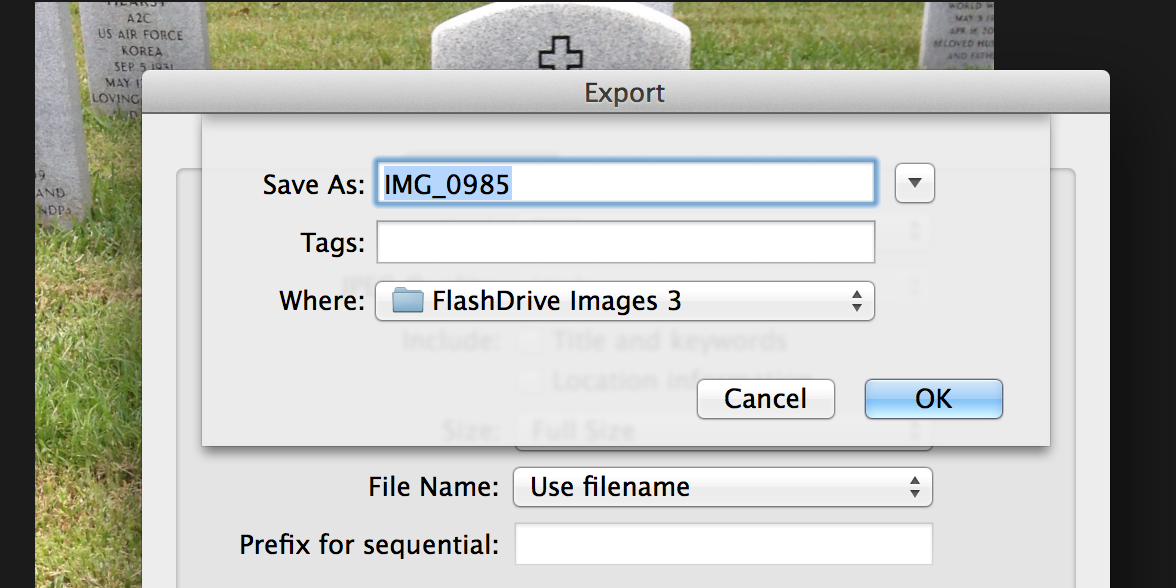
Finally It will say SAVE AS.... and you name the image you want to send and where it is going. Be careful here, because once you fill these in and click OK.... the images will be moved INSTANTLY.
SEE, I told you it wasn't that big a deal. And once you do it a couple of times it makes things so easy! Hope this helps. I'm not the biggest techie in the world but when I find something and it works I like to share it. I know that not everyone likes or uses iPhoto, but if you've thought about it, now might be a good time to give it a try!
Happy Researching!
Karen
I've always been a windows user, UNTIL about a year and a half ago my son introduced me to the world of MAC. I love my MAC. There was a bit of a learning curve, won't deny it. And I must say I'm still learning. The hardest thing for me was not having that photo editing software to work with. I'm a creature of habit, once I find something that works for me, I don't change it. Ever. Well toss that out the window. Being on this Mac I had to change my editing software. No choice.
So I sat down one day and went thru the video's at UTube until I found some on using iPhoto. Wow. If you get someone who really knows their stuff you can conquer about anything. So let me show you how I learned to work with my images in iPhoto!
First thing you have to do is figure out where you have the images you want to work on and then where you want them to go when you are done with them. Once you have that you've got it made. Now comes the fun part. So here we go! The captions UNDER each photo will explain the process for that screen.... READY?
Above - The screen that starts it all. Ignore the "Recent". Look at the pull down window. See where it says, IMPORT TO LIBRARY? Yeah that one. Click on it. When you do it opens .....
Once your download is complete you will see your photo's displayed as you see above. Up in the right corner it will even tell you how many photo's you have in that download. Next you need to choose the image that you want to edit. You need to choose the photo that you need to edit. When you click on the photo, it will put a yellow "frame" around it.
After you see the yellow frame, look down into the bottom right hand corner of your iPhoto screen. You want to find the image you see above. Pretty straight forward eh? You want to click on EDIT.
Once you click on EDIT, the the window above will appear. Not rocket science at all. It does exactly what it says it will do. The primary ones I use are straighten and crop. It should offer a bit of comfort knowing that you can always UNDO or REVERT TO ORIGINAL.
As you can see in my image above the headstone photo is a bit off kilter. So I've chosen "straighten". The Slider bar and grid on the screen make it easy to straighten about any image you have need to. Not complicated, simple and functional. Just what the technology challenged need!
Once you have finished straightening you click on Crop and the window you see on the right opens. It gives you all sorts of choices. You can start at the top of the list and work your way down. As you choose you can see right on your screen what it will be like on your image. How can you miss it when its showing you as you do it? When you get it done the way you like, you simply click DONE. That's it. You edited your photo and had no strokes or heart attacks. No you are ready to move the images you've edited into a folder. Once again you'll have to decide where to put the photo's.
Next step is back to the window again. File>EXPORT.... yep you are going to send the images to a new home. No stress, No worry! Its really quite simple. Click on Export and you'll get another window....
When you get this window you've really been busy. So you choose the kind of picture - I chose TIFF, but Jpg and others are in there as well. I always mark HIGH QUALITY, and I include Title & Keywords and Location information. I also tell it to USE FILENAME......
Finally It will say SAVE AS.... and you name the image you want to send and where it is going. Be careful here, because once you fill these in and click OK.... the images will be moved INSTANTLY.
SEE, I told you it wasn't that big a deal. And once you do it a couple of times it makes things so easy! Hope this helps. I'm not the biggest techie in the world but when I find something and it works I like to share it. I know that not everyone likes or uses iPhoto, but if you've thought about it, now might be a good time to give it a try!
Happy Researching!
Karen

Labels:
Ansley,
Boomershine,
Eudaley,
Family History blog,
Genealogy Blog,
Hess,
Kreitzer,
Krugman,
Ligon,
Morris,
Nix,
Peterman,
Reusch,
Technology,
Winstead
14 October 2014
Lists - My Favorite Research List
Last week I did a series on feeling overwhelmed in your research. In that series I talked about my research lists and promised to share how I do them in Legacy. Warning this post is heavy in the images department so it might be slow to load if you are on a dial up connection.
First of all let me start by saying I don't like the report feature. I've never liked it, not even when I used other software. So I set out to find a way to get what I want in the easiest way possible. That's when I figured out that I could make the "search" feature work for me. I've used this for years, I love it and today I'm going to show you how I do it.
When you open Legacy you see the top of your screen which has your tool bar and the tabs across the top. We aren't going to deal with the tabs. Today's blog is about the tool bar. You will want MY TOOLBAR highlighted. Under that if you look to YOUR left of that you will see SEARCH.
Click on SEARCH and it will open the window you see below. Its not a complicated window so you should be able to see there are THREE conditions available to search by. You set the conditions based on what you are working on. You may or may not need all three conditions. Your choice. When I am going to an archive to work I usually use all three. You should take some time before you get into this to decide what you want to use this for and exactly what it is you are after. This is my favorite for archive & locality work. Helps me see where the holes are in that area.
Once you figure out where you want to research then you can focus on the people that are there. You do this by filling in the "conditions. As you can see below there are three "conditions" available to use. I use "individual" and then continue on with birth place, Marriage place, death place or whatever conditions you want. After that you decide on where you are going to research. For this example I chose Montgomery County, Ohio. You type in what you want. Make sure that you fill this in exactly as you have it in your program or you get no where. It has to match. Once you've made your choices you will see at the bottom CREATE LIST. Click it.
The program is going to take a few seconds/minutes depending on how many people in the area you have. This Montgomery County list that I created has abt 280 pages. My family (maternal) has been in Montgomery County since the very early 1800's. When it has done its thing it will give you a screen much like the one below. It has your list on the left. On it is everyone who fit the "conditions" that you put in above. A very nice little list indeed! And so simple to get!
One little thing that greatly affects the length of your list is shown below. If you look directly below your list, you will see a small button, OPTIONS. The pull down window will open. Make sure that you unclick "include married names". It gives you many duplicates that I personally find totally uncalled for. To the right of that button is one that says print. Click on it.
When you click on that PRINT button the screen below comes up. This is where you define how your report will be spaced. I keep it pretty simple, spread it across one page, one row. Very seldom do I see a need for two rows. If you look under the OPTIONS tab on the screen below this text you can see the options for headers and the name you want on the report.
Down in the far right corner you see the REPORT settings. I like using the PDF option as I can save it and have a copy just in case. Once you decide if you want pdf or whatever, you go back to the top right and click CREATE. You won't see the CREATE button unless you mark the pdf button. Once you hit create it will ask you what to name your file and where you want it saved to. Your choice on that one.
The list will appear on your screen and a box will pop up asking if you want to view your pdf. If you say yes, then something like this will appear! My search list looks like this.... As you can see it gives me the persons name, id number, birth, death, spouse and marriage information. With this I can walk into any Archive and I know exactly what I am in need of. You can change those settings to reflect more or less information, depending on what it is you are in need of. As in any piece of software its only as good as you make it.
So now you have it. My favorite list to use when I'm researching at an Archive or library. I've shown you how to do this in Legacy, but I'm sure that other pieces of software are capable of doing the same thing, it just take you a few tries to get it the way you want it. Although this post seems long and the process difficult, I can generate & print one of these in under four minutes (yes, I timed it!). Leaves me plenty of time to dress, grab my keys and be out the door and on my way to a great day of reseaching ANYWHERE very quickly. Hope it works for you!
Karen
13 October 2014
Monday Musings
I've been going over some of my lists - stuff that I need to focus on. I discussed my list making last week in my "Overwhelmed"series. So much I want to do and so little time to get it done. Seems like when you get one done you come up with another project another list that you just need to work on.
I was in Ft Wayne at the Allen County Public Library researching for a few days this past week. Can't say I broke down any major brick walls but I did find some things.
Today is Thanksgiving Day here in Canada. We are here while Mr. Brown Eyes is on a job assignment for Ford. In a very nice apartment here with very good wi-fi so the research and blogging can continue. Sure beats a hotel! Many of the comforts of home here, just on a smaller scale. Either way I'm just thankful that I have the opportunity to travel and be with him where ever it may be.
I'm planning on writing a few blog posts today, at least one focusing on how to make the lists with my genealogy software.
Happy Thanksgiving to my Canadian readers!
Karen
02 October 2014
Overwhelmed? Let's Talk Organization!
Organization is a major issue for a lot of people. I'm not exception. I'm working very hard at organizing some things in my life, but I can tell you right now, it's not easy.
Organization covers alot of ground. It applies to lots of different aspects of our lives. Things that we need to organize in order not to feel overwhelmed can include all sorts of things - for example -
Last year I went thru all my closets (except Mr. Brown Eye's). One closet a week. All items taken out, gone thru. Some stuff donated, some stuff moved to another location, some stuff just tossed in trash. Deciding what I needed, what I didn't was a major chore. But I did it. It's not just about our household organization but our genealogy space organization. So I also did my office closet and desk.
Whether you have a room you call an office or whether you have a corner desk in the living room for your genealogy, organization is a major issue. There is nothing worse, at least to me, to go to a major repository to research, make a MAJOR find, go to type it in your computer data base only to discover its ALREADY THERE!!!!!!!!! And I know that you've done that. We all have. Because we haven't taken the time to stop digging long enough to dig ourselves out of the mess & clutter we call our "office" or "genealogy desk". If we stopped researching, just for a week or two, and took the time to get rid of the piles of papers, the clutter, the mass of disorganization, what a difference it would make in your productivity. Yes, I know its hard!
Just think if your desk wasn't covered in piles of paper you could have a list of exactly what you want to search for. Then when you have 15 minutes to sit down and research, you'll know exactly what you want to look and where! It would make such a difference in how you see things. With a decluttered desk you won't feel so overwhelmed.
There is a Facebook page for genealogy organization, "The Organized Genealogist". It is a closed group, meaning you will have to ask to be included. Keep in mind that reading all the posts can be very overwhelming. But there is alot there, with the focus being on organizing your genealogy. No genealogy surnames or such allowed. Great group.
So what will you take time to organize this week? Have you recently reorganized your genealogy space? Do you wish you had done it sooner?
Organization covers alot of ground. It applies to lots of different aspects of our lives. Things that we need to organize in order not to feel overwhelmed can include all sorts of things - for example -
- Kitchen
- Closets
- Daily Chores
- Computer Files
- Garage
- Collections (in my case my cookbook collection)
- Offices
Last year I went thru all my closets (except Mr. Brown Eye's). One closet a week. All items taken out, gone thru. Some stuff donated, some stuff moved to another location, some stuff just tossed in trash. Deciding what I needed, what I didn't was a major chore. But I did it. It's not just about our household organization but our genealogy space organization. So I also did my office closet and desk.
Whether you have a room you call an office or whether you have a corner desk in the living room for your genealogy, organization is a major issue. There is nothing worse, at least to me, to go to a major repository to research, make a MAJOR find, go to type it in your computer data base only to discover its ALREADY THERE!!!!!!!!! And I know that you've done that. We all have. Because we haven't taken the time to stop digging long enough to dig ourselves out of the mess & clutter we call our "office" or "genealogy desk". If we stopped researching, just for a week or two, and took the time to get rid of the piles of papers, the clutter, the mass of disorganization, what a difference it would make in your productivity. Yes, I know its hard!
Just think if your desk wasn't covered in piles of paper you could have a list of exactly what you want to search for. Then when you have 15 minutes to sit down and research, you'll know exactly what you want to look and where! It would make such a difference in how you see things. With a decluttered desk you won't feel so overwhelmed.
There is a Facebook page for genealogy organization, "The Organized Genealogist". It is a closed group, meaning you will have to ask to be included. Keep in mind that reading all the posts can be very overwhelming. But there is alot there, with the focus being on organizing your genealogy. No genealogy surnames or such allowed. Great group.
So what will you take time to organize this week? Have you recently reorganized your genealogy space? Do you wish you had done it sooner?
Labels:
Ansley,
Bloss,
Family History blog,
Family History Research,
Genealogy Blog,
Krugman,
Ligon,
Morris,
Nix,
Organization,
Phillips,
Presley,
Reusch,
Self help,
Sellars,
Sellers,
Stanford,
Waddel,
Waddle,
Winstead
30 September 2014
Overwhelmed? Let's Talk Priorities!
In Monday's post on feeling overwhelmed, my number #1 to help decrease that way of feeling overwhelmed was to prioritize. Often when you are overwhelmed just figuring out where to start is difficult. So I'm going to offer some suggestions - elaborate on just how to do the things I suggested.
The first thing I suggested was to PRIORITIZE your life. For me it wasn't that hard, I already knew what my priorities were. I just needed to see them again. Remind MYSELF of what they were. We get so caught up in just being alive that we sometimes let things get out of hand.
So I sat down and made a list of just what matters to me. Your list may change as things change in your life. The list of a retiree will probably be different than that of a new mom or a mom with small children.
I won't put my whole list up here but an example of my list would be:
Second on the list was OUR home. No, OUR home is not all my responsibility, but I take great pride in taking care of our home. I am a homebody, I love being here at home, surrounded by the photo's and things that make this house our home. And I like it kept a certain way. That's important to me. So I make a window of time each day available for its upkeep. I'm primarily an early bird so I'm up getting Mr Brown Eyes off to work. While I'm up and he's headed out, I plan dinner, toss in laundry, straighten up, make the bed and I'm done with housework and usually in my office by 8:30. In the summer it might be later because I enjoy weeding and doing gardening when its cooler outside.
Third, fourth and fifth - the genealogy, gardening and reading really are flexible to me. Alot depends on other factors. If its going to be a beautiful day outside I might take my laptop and work on the patio, with breaks from typing to pull some weeds. The only two items on that list that are locked in stone are #1 & #2.
It ALL boils down to PRIORITIES. It really is that simple. So what are your priorities? Have you made your list? What makes your list?
The first thing I suggested was to PRIORITIZE your life. For me it wasn't that hard, I already knew what my priorities were. I just needed to see them again. Remind MYSELF of what they were. We get so caught up in just being alive that we sometimes let things get out of hand.
So I sat down and made a list of just what matters to me. Your list may change as things change in your life. The list of a retiree will probably be different than that of a new mom or a mom with small children.
I won't put my whole list up here but an example of my list would be:
- My family - includes husband, children & grandchildren
- Our home
- Genealogy
- Gardening
- Reading
Second on the list was OUR home. No, OUR home is not all my responsibility, but I take great pride in taking care of our home. I am a homebody, I love being here at home, surrounded by the photo's and things that make this house our home. And I like it kept a certain way. That's important to me. So I make a window of time each day available for its upkeep. I'm primarily an early bird so I'm up getting Mr Brown Eyes off to work. While I'm up and he's headed out, I plan dinner, toss in laundry, straighten up, make the bed and I'm done with housework and usually in my office by 8:30. In the summer it might be later because I enjoy weeding and doing gardening when its cooler outside.
Third, fourth and fifth - the genealogy, gardening and reading really are flexible to me. Alot depends on other factors. If its going to be a beautiful day outside I might take my laptop and work on the patio, with breaks from typing to pull some weeds. The only two items on that list that are locked in stone are #1 & #2.
It ALL boils down to PRIORITIES. It really is that simple. So what are your priorities? Have you made your list? What makes your list?
Labels:
Ansley,
Blose,
Bloss,
Boomershine,
Cemeteries,
Cemetery,
Family History blog,
Family History Research,
Genealogy Blog,
Kreitzer,
Krugman,
Ligon,
Morris,
Nix,
Phillips,
Presley,
Priorities,
Reusch,
Self help,
Winstead
29 September 2014
Overwhelmed? Here's Five Steps To Help!
Do you ever feel overwhelmed by the amount of genealogy information being "thrown" at you these days? A sense of being totally overwhelmed by the "information highway"? It seems like everyday there is some new technology, something new to search, something new to try, a new website, a new genealogy Facebook page, you want to look at them all but you've got kids to take care of, the laundry calls, someone has to make dinner and the list seems to just keep growing on both the personal and the genealogy sides?
I know how you feel! It can be tough. But I've learned some things so I thought I'd share them with you. This is how I survive, can't swear it will work for you but some suggestions that might help.
- Priorities - Sit down, step back and take a hard look at just what it is that is truly important to you. Yes, I know you really want to find out who the parents of John Smith are. We all do. But the fact is, he's been dead for over 200 years. He can wait. Stop and take a good look at what really matters. Then plan your time around those things.
- Organize - You would be amazed at how much easier life is when you organize your life. Not just your genealogy but your day to day life as well. I didn't say it was easy or that it would happen over night, but it can be done. By having things organized, you can quickly get things done without spending half the time you wanted to use researching or doing household chores looking for things to help get the job done. Make a place for everything and put everything in its place.
- Simplify - Again it really makes like easier if you learn to simplify things. I enjoy cooking and baking as one of my "other" hobbies. I sometimes see really great recipes with tons of ingredients and steps to making them. Reading over the process I usually find a way to side step alot of the process and still get the same results. There are alot of things that you can do to simplify things. In genealogy, when doing some internet searches I search using ONE group sheet. Yep, just one family and search only for that family. No rabbit hole running.
- Make Lists - Not just in your genealogy but in your daily life. Sit down and make a list of the chores that you need to take care of. Sometimes by multitasking & dividing you can shorten the time it takes to get the job done. By making a list you can see what chores are the most time consuming and perhaps do one per day, combined with several smaller chores each day. Everything gets done and you win with more time for doing the things you want to do instead of what you have to do.
- Learn to say NO - Being a stay at home mom for all of our marriage meant that I was one of those who got asked to do EVERYTHING. You know, you are at home watching soaps and eating bon bons so of course you have time to be on every committee and do everything right? I learned early on that if I accepted everything that I was asked to do I quickly had no time to do the things I needed/wanted to do at home. So I stepped back, decided which things were the most important for me to do at school to support the activities I felt important and then adjusted my time to fit that in. Everything else was "Sorry, I'd love to help but I'm already volunteering on several other projects."
26 September 2014
Like Father Like Son
Academy Cemetery, Jefferson, Jackson County, Georgia
The Jackson Herald, October 26, 1894
Andrew Ansley
Little Andrew Ansley, step-son of Mr. R. L. Dean, who lives about three miles above town, died of dropsy on last Sunday and was buried at the Academy burial grounds Monday.
The first time I knew that my ancestor William Ansley had a brother, Andrew, was the 1880 census for Jackson County, Georgia. I had been searching for William for some time but until now had not been successful in locating him. In fact I wasn't even sure it was him for quite some time.
The 1880 Federal census shows the family as - Ansley, Mary, a white female, age 22, keeps house, can't read or write. She was born in Georgia as were both her parents. Ansley, William, white male age 3, son, single, born in Georgia and Ansley, Andrew, white male age 1, son, single, born in Georgia.
Mary E. aka Marietta Waddel had married Joseph Ansley 17 NOV 1875 in Jefferson, Jackson County, Georgia.
However, the newspaper clipping is the ONLY time, besides the marriage record that Joseph & Marietta are EVER together. He appears on NOTHING, no census, no land records no NOTHING.When Joseph disappears, sometime between 1879 & 1882, I figured I still had Mary, William & Andrew. With no census for 1890, I couldn't track the little family during that window of time. The 1900 census comes and Marietta/Mary has remarried and has been busy having babies with the new husband. William is living next door to his mom & her new family. Only Andrew is NO WHERE TO BE FOUND! First thing comes to mind is that possibly he is with Joseph, his father. For years I search to no avail.
Then one day Mr. Brown Eyes types Andrew Ansley into a search engine and up pops the clipping on Andrew. Telling of his death from dropsy, his burial. Different circumstances, but still alot like his dad. We know so much but we know so little. Andrew's little snippet from the paper tells us he died of dropsy, that he was the step son, no mention of Joseph at all. He rests in an unmarked grave in the cemetery pictured above. Perhaps that too is like his father, perhaps Joseph rests somewhere in an unmarked grave? We may never know.
Labels:
Ansley,
Boomershine,
Georgia,
Jackson County,
Krugman,
Ligon,
Morris,
Nix,
Reusch,
Waddel,
Winstead
24 September 2014
Wedding Wednesday - A 50th Wedding Anniversary Celebration
Golden Wedding
Fifty years ago, October 32, 1863, Lewis H. Zehring and Miss Elizabeth Gebhart, daughter of Emanuel Gebhart, were united in marriage by Rev. C. Albrecht. For a half century they have resided in Miamisburg, excepting a brief period, when they resided in the country near town.
Squire Zehring is one of the best known men in the county, and has always been active in the life of the community. For over thirty years he served as justice of the peace, and for over forty years has been a notary public. He served three years as county commissioner. He is still a director in the Mutal Building Association, in which he was secretary. For ten years he was mayor of Miamisburg, and is now a member of the Board of Education, and a cemetery trustee. Industrious, genial and faithful, Squire Zehring counts his friends by hundreds, and though past three score and ten, is still a young man in thought and action.
Handsome invitations have been issued to many friends for a reception at the Zehring home on Linden avenue this afternoon and evening, when an opportunity will be afforded to extend congratulations and best wishes to the happy couple, who have enjoyed fifty years of life in unbroken wedlock.
Their two daughters, Dr. Blanche Zehring of Wells College New York, and Mrs. Laura Zehring Dosch of Elizabeth, N. J., are both at home visiting with their parents for the happy anniversary.
**The Miamisburg News (Miamisburg, Ohio), Thursday, 23 OCT 1913, Front Page; Copy in files of Karen Krugman.
21 July 2014
Monday Musings
Been a busy few weeks here and an awesome weekend to top it all off. We've been staying busy with yard work. This past winter was so cold here in Michigan and the snow amounts were so bad... I know I've not seen this much snow here since I moved here 21 years ago. That said, our roses took a major hit. After much research and discussion we opted to cut them back drastically and see if maybe over the next few months they will come back. I'm pretty sure that at least two are done. We have many flower beds here at Karma Gardens and keeping up with them at times can be a daunting task. That's okay, the beauty they provide more than outweighs the work we do to keep them up.
Took a break from the upkeep of the property and went to Lansing on Friday and Saturday for the Summer Seminar put on by the Abrams Foundation & the Michigan Genealogical Council. What a great job they did. A wide variety of speakers covering a wide spectrum of topics. I think all the attendees really enjoyed themselves. Friday night was the lock in, 38 lucky persons were "locked" in the Michigan Archives for an evening of research. What a great evening.
There will be another seminar at the library on Saturday November 1st. All the details are in process but from what I saw at this past weekends seminar, the focus will be German & Pennsylvania research. Mark your calendars! I'm sure you won't be disappointed.
Happy Monday everyone!
Karen
Labels:
Ansley,
Boomershine,
Family History,
Genealogy,
Hess,
Johnson,
Karma Gardens,
Krugman,
Ligon,
Michigan,
Morris,
Phillips,
Presley,
Reusch,
Waddell,
Winstead
18 June 2014
Medina, Ohio Research - Marriage Record Klooz & Zacharias (1886)
William Mathias Klooz was born on 2 APR 1859 in Lorain County, Ohio and died 25 SEP 1930 in Liverpool Township, Medina County, Ohio. Louisa E. Zacharias was born in 1861 and died 09 JUN 1937 in Liverpool, Medina County, Ohio. They were married 16 FEB 1886, Medina County, Ohio.
William Mathias Klooz
The death of William Mathias Klooz, Valley City, Ohio took place at the home of his daughter, Mrs. George Huttinger, 517 Fifteenth Street, Thursday morning. He had been in ailing health for some time.
Mr. Klooz was born in Lorain County, April 2, 1859 and had lived in the county all his life.
Surviving him are his widow, Mrs. Louise Klooz, seven children: Miss Harriet Klooz of Detroit, Miss Alma Klooz at home, Harley of North Eaton, Harvey of Columbia, Mrs. George Huttinger of Elyria, Mrs. Claude Reusset [sic] of Valley City, and Mrs. Jerry Kritof of Elyria; eleven grandchildren, and one sister, Mrs. Mark Dowden of Lakewood, Ohio.
Funeral services will be conducted Monday afternoon at one o'clock from the home of his son, Harvey Klooz of Columbia Ohio, with the Rev. Muhly officiating. Burial will be made in Hardscrable Cemetery.
**Chronicle Telegram (Lorain County, Ohio), Friday, 26 SEP 1930, Pg. 2, Col. 3
**Death Certificate, Ohio Department of State, Lorain County, Ohio, Certificate #54975, 29 SEP 1930
**Application for Letters of Administration, Medina County, Ohio Probate Court, 29 OCT 1930
Mrs. Louise Miller
Mrs. Louise Klooz Miller passed away at her home in Valley City on Wednesday night. Mrs. Miller was born in Liverpool township in 1861 and lived her entire life there and in Columbia. She was united in Marriage to William Klooz, who preceded her in death seven years ago. To this usion were born six children, Alma Klooz, who passed away six months ago, Harley Klooz of Valley City, Harvey Klooz of Columbia, Mrs. Irene Huttinger of Elyria, Mrs. Blanche Reusch of Valley city, Mrs. Gladys Kristof of LaPorte.
She also leaves a step daughter Harriet, her husband, Frank Miller, whom she married June 7, 1932, thirteen grandchildren, three sisters and two brothers.
Funeral services will be held Sunday at the home of her daughter, Mrs. Reusch of Valley City at 1:15 pm and at the St. Paul's Lutheran Church in Valley City at 1:30. Burial will be made in Liverpool Cemetery.
**Chronicle Telegram (Lorain County, Ohio) Saturday, 12 JUN 1937, Pg. 2
17 June 2014
Tombstone Tuesday
Truman C. Wolf & his wife, Lucille L. Baker Wolf.
Photo by Mark & Karen Krugman
2009
Truman Wolf (1911-1973) and wife, Lucille Baker Wolf (1914-1971) married 27 SEP 1941, Liverpool, Medina County, Ohio. Buried in Zion Lutheran Cemetery, Valley City, Medina County, Ohio.
See blog entry on 17 JUN 14 for more information on this couple.
Happy Researching!
Karen
16 June 2014
Medina, Ohio Research - Marriage Record Wolf & Baker (1941)
Truman C. Wolf (son of Charles Wolf & Lydia E. Damman) was born in Valley City, Medina County, Ohio on 10 DEC 1911 and died 5 OCT 1973 in Medina County, Ohio. His wife, Lucille Baker, was born in 1914 and died 7 JUN 1971, probably in Medina County, Ohio.
I was searching for a marriage record on this couple, and it was found on the vital records microfilm at the Medina County Library Genealogy Room. It confirmed what was originally found on FamilySearch.
Truman & Lucille Baker were married 27 SEP 1941, Medina County, Ohio.
**Ohio, County Marriages, 1789-1994," index and images, FamilySearch (https://familysearch.org/pal:/MM9.1.2/993K-5RLZ : accessed 13 Jun 2014), Truman C Wolf and Lucille L Baker, 27 Sep 1941; citing Medina, Ohio, United States, reference ; FHL microfilm 000475471
Truman Wolf
Truman Wolf, 61, of 5247 Fenn Road, Medina, died unexpectedly last night of a heart attack.
Mr. Wolf was a lifetime resident of Valley City and was employed at the Chevrolet Plant at Brook Park.
Surviving are his widow, Emma; sons, Ronald of Niles, and Dennis, Columbus; two daughters, Mrs. Laura (James) Gardner, Medina; Mrs. Jacqueline (James) Bishop, Toledo; father, Charles and two sisters, Mrs. Eileen Reed and Mrs. Florence Hill; one brother, Gilbert, all of Valley City; four grandchildren.
Friends may call Sunday afternoon and evening in the Bauer Funeral Home, 2089 Columbia Road, Valley City. Services will be a 2 p.m. from Zion Lutheran Church. Burial will be in the church cemetery.
**Medina County Gazette, (Medina County, Ohio), 6 OCT 1973, Pg. 2
06 January 2014
Military Monday - Confederate William A. Manser
In my many years of research I've always enjoyed military records. I know many people shy away from them or are intimidated by them. Whenever I see anyone young enough to be "in the service" of their country and die during the time frame a military action was taking place, I head right out to search for some indication of how they might have died. I have a subscription to Fold3 and I use it ALOT!
Such was the case with William Augustus Manser, son of Miles Manser (1798-1873) and his wife, Catherine "Caty" Morris (1797-1887). William was the fourth of five children born to the couple - Edna, Eunice, Miles Jr., Wm. A. and Virginia.
Catherine Morris, mother of William was the daughter of Benjamin Morris (1770-1829) and his wife, Nancy Jarrett (1769-1832). Benjamin & Nancy are direct line for Mark, being his 6th great grandparents.
When I found the death date for William I immediately went to Fold3 and was not surprised when I found several muster roll entries and then this....
Doesn't get much better than finding something like this, confirming my suspicions. Now I have the rest of the story.
Happy Researching!
When I found the death date for William I immediately went to Fold3 and was not surprised when I found several muster roll entries and then this....
Doesn't get much better than finding something like this, confirming my suspicions. Now I have the rest of the story.
Happy Researching!
Labels:
Civil War,
Confederate,
Fold3,
Jarrett,
Kanawha,
Manser,
Military Monday,
Morris,
Piedmont,
Virginia
Subscribe to:
Posts (Atom)