It was quite the research trip/vacation. We covered so much in the 2+ weeks we were on vacation. Made over 300 paper copies and probably as much if not more, in digital copies.
We found obits, photo's, deeds, will and colonial records. And we have copies of all of it. Copies to be moved, cropped, linked and typed.
I spent part of last week moving all the photo's around, putting them in my digital photo filing system. A few have been added to digital multimedia files to the persons that they pertain to in Reunion. Lots more to get done.
I'm most excited about the colonial records I found on my ancestor Thomas Ansley, who was in Wrightsboro, Georgia in the early 1770's. I'll be sharing those images in the next days & weeks as I get them processed.
Of course coming back from a vacation means "stuff" always needs to get done - things need to get put away, some minor cleaning never hurts, and of course I HAD to take time out to see the grandsons & kids. We brought my mom back with us, so a bit of adjusting to having a third person here in the house with us.
So its been quite the month so far. Any interesting discoveries for you this month? Are you researching at all? Perhaps you're enjoying your summer gardens and your own vacation. Either way, enjoy!
Happy researching!
Karen


Showing posts with label Winstead. Show all posts
Showing posts with label Winstead. Show all posts
18 July 2016


11 November 2015
Not Your Average Bump On A LOG (Reunion)
It seems every one has an opinion, some people love them, some people have no use for them. In my case I can't imagine not having them. Reunion calls them "LOGS", some programs call them "To Do" lists. Whatever they are called, I love them!
Switching from Legacy to Reunion, which was one of the hardest decisions I've ever had to make with my genealogy, took a bit of a learning curve. No lie, pure honesty, and it took some work to get my genealogy to be workable. BUT, I do believe it was a very good decision. Now that I've got things under control (read that as still under construction lol) I'm having a good time making Reunion work for me.
One of the best features about Reunion is the Logs feature. Below are some images of how I have made the logs work for me -
The first shows a screen shot. You can see here that the Logs are found on the sidebar with your other basic choices. Very easy to find and get to.

In the second screen shot below you can see the list I've made of the places I am currently, or I hope to be researching. I've got Allen County library, along with all these other places that I have found I need work done. I've even got one for things that I really need to do right here at home. Each place that I have listed has its own "page", where you can keep track of the items that you need to locate at that location.
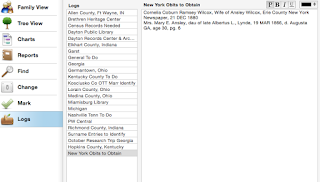
In this third shot you can see how I am using this Log feature by keeping lists of what I need to locate in each log, including call numbers and notes. Being able to color code things like call numbers is really helpful as it helps the call numbers stand out from the other notes. In this example you can see that I have call numbers showing in Blue. I've also been adding notes, in red, into my logs when I've researched something and perhaps didn't find what I wanted or maybe found other information.
 I find the flexibility that is available in the "LOGS" very useful. Lots of room to make your to do lists as extensive and detailed as you would like them to be! If you note the upper right hand corner of the LOG you can change fonts, font sizes, colors, bold, underline etc., all of which contribute to the flexibility of the LOG.
If you are Reunion software user and haven't given these a try, hopefully this post encourages you to try the LOGS feature. Are you using the Logs feature? If so, do you use it in ways that I have not shown here? I'd love to hear from you. Please leave a comment and tell me how you use the LOGS feature!
Happy Researching!
Karen
Switching from Legacy to Reunion, which was one of the hardest decisions I've ever had to make with my genealogy, took a bit of a learning curve. No lie, pure honesty, and it took some work to get my genealogy to be workable. BUT, I do believe it was a very good decision. Now that I've got things under control (read that as still under construction lol) I'm having a good time making Reunion work for me.
One of the best features about Reunion is the Logs feature. Below are some images of how I have made the logs work for me -
The first shows a screen shot. You can see here that the Logs are found on the sidebar with your other basic choices. Very easy to find and get to.

In the second screen shot below you can see the list I've made of the places I am currently, or I hope to be researching. I've got Allen County library, along with all these other places that I have found I need work done. I've even got one for things that I really need to do right here at home. Each place that I have listed has its own "page", where you can keep track of the items that you need to locate at that location.

In this third shot you can see how I am using this Log feature by keeping lists of what I need to locate in each log, including call numbers and notes. Being able to color code things like call numbers is really helpful as it helps the call numbers stand out from the other notes. In this example you can see that I have call numbers showing in Blue. I've also been adding notes, in red, into my logs when I've researched something and perhaps didn't find what I wanted or maybe found other information.

If you are Reunion software user and haven't given these a try, hopefully this post encourages you to try the LOGS feature. Are you using the Logs feature? If so, do you use it in ways that I have not shown here? I'd love to hear from you. Please leave a comment and tell me how you use the LOGS feature!
Happy Researching!
Karen
10 November 2015
Happy Birthday Mandi!
When I was expecting, I wanted a little girl so very badly. God answered my prayers, and he gave us the very best daughter we could ever wish for. She's an awesome mom, faithful, loving wife, sister and one of my very best friends. I won't say her teen years were the best ever, but I'm so proud of the woman she has become. There is NOTHING that she can't do - remodel a kitchen, a bathroom, lay tile, refinish floors - you name it. She's wonder woman and I'm proud to say she's our daughter. Love you Mandi!
HAPPY BIRTHDAY MANDI!
 |
| December 1983 |
 |
| Summer 2010 |
 |
| With Her dad, Mark, Saturday, Nov 7, 2015 |
04 November 2015
Wowsers Wednesday!
Earlier this year I switched from the Windows world to the Mac world. I must admit quite a change. Yes, there was a bit of a learning curve, which I think I've managed to handle pretty well. For those times when I hit bumps I had an awesome son to help me over them.
When I decided to go from Windows to Mac the biggest change was the genealogy software. My good friend, Diane has been using Reunion for Mac for quite a while, and her help was just awesome. Its great knowing I can ask and she's there for me. I've also joined two great groups on FB for help. One is Mac Genealogy and the other, which is actually my favorite, is the Reunion Software Users group. Fabulous Reunion support there.
I figure I am about 80% complete with the cleanup and straighten up of my data after the transfer in off all my information. I find Reunion to be a bit of a learning curve, but then again, nothing I can't handle.
I know I've been away for a while from my blogging, but the switch over combined with an office makeover, redoing all my files (remember review review review?) and normal day to day activities, I just figured a break was the thing to do.
For those who have stuck around thanks! For the those who just signed on thanks!
Hoping to get back in the "saddle" and get busy with the blogging again!
Happy researching!
Karen
When I decided to go from Windows to Mac the biggest change was the genealogy software. My good friend, Diane has been using Reunion for Mac for quite a while, and her help was just awesome. Its great knowing I can ask and she's there for me. I've also joined two great groups on FB for help. One is Mac Genealogy and the other, which is actually my favorite, is the Reunion Software Users group. Fabulous Reunion support there.
I figure I am about 80% complete with the cleanup and straighten up of my data after the transfer in off all my information. I find Reunion to be a bit of a learning curve, but then again, nothing I can't handle.
I know I've been away for a while from my blogging, but the switch over combined with an office makeover, redoing all my files (remember review review review?) and normal day to day activities, I just figured a break was the thing to do.
For those who have stuck around thanks! For the those who just signed on thanks!
Hoping to get back in the "saddle" and get busy with the blogging again!
Happy researching!
Karen
19 May 2015
Who Thought Painting An Office Would Be So Much Work?
I knew it would be a big job, I guess I just never thought how BIG the job was. I was so excited when we moved into this house. Finally, after raising our two kids and then marrying them off... (LOL), we got our dream house. I actually could have a room of my own for my genealogy.
Well, its been almost 8 years and somehow time slipped away. I was so thrilled to have my own space. I could leave my research books on the desk, my very own desk, and not have to pick them up so we could have dinner or tax clients could be assisted. The problem is, who wants to take time out from researching to paint?
Several weeks ago, Mr. Brown Eyes announced that I was going to NGS for the national genealogy conference. I'd been wanting to go for many years but the timing just wasn't right. Well this year, I did go. While I was gone he had my office painted. It's absolutely beautiful. I chose the color and left the paint chip for my painter. It has blown me away. WOWSERS!
The only problem is, everything but the desk had to leave. Even the two lateral filing cabinets. Which means that all the files had to COME OUT so they could be moved. Well the paint job is beautiful (Dan the painter ROCKS!)... but now that I am home I get to put it all back together.
So I'm going to blog, not about paint or putting offices back together, but about my genealogy. Won't promise its going to be exciting or anything, but I'll try to get some genealogy up here in the next day or so.
So EVERYTHING is back in the office, alot of it in boxes, some of it is back but NOT going back in the cabinets - I want to go thru all those files and make sure all is scanned & typed. So another project is under way. One day maybe I'll get it all done the way I want it. Until then I'll just keep plugging away.
Happy Researching
Karen
Well, its been almost 8 years and somehow time slipped away. I was so thrilled to have my own space. I could leave my research books on the desk, my very own desk, and not have to pick them up so we could have dinner or tax clients could be assisted. The problem is, who wants to take time out from researching to paint?
Several weeks ago, Mr. Brown Eyes announced that I was going to NGS for the national genealogy conference. I'd been wanting to go for many years but the timing just wasn't right. Well this year, I did go. While I was gone he had my office painted. It's absolutely beautiful. I chose the color and left the paint chip for my painter. It has blown me away. WOWSERS!
The only problem is, everything but the desk had to leave. Even the two lateral filing cabinets. Which means that all the files had to COME OUT so they could be moved. Well the paint job is beautiful (Dan the painter ROCKS!)... but now that I am home I get to put it all back together.
So I'm going to blog, not about paint or putting offices back together, but about my genealogy. Won't promise its going to be exciting or anything, but I'll try to get some genealogy up here in the next day or so.
So EVERYTHING is back in the office, alot of it in boxes, some of it is back but NOT going back in the cabinets - I want to go thru all those files and make sure all is scanned & typed. So another project is under way. One day maybe I'll get it all done the way I want it. Until then I'll just keep plugging away.
Happy Researching
Karen
16 March 2015
Monday Musings
Happy Monday to everyone! Hope your weekend was great. The snow is melting here and temps are on the rise. Maybe winter is on the way out! One can hope eh?
Spent much of this past week working on linking and naming images. Seems as though that is a never ending process. I use it not just for genealogy but for recipes as well. Once I type them in to my recipe data base I link the scanned images to the recipes. Works great!
On the genealogy front, I'm cleaning up my digital files and image folders. Somehow, there's always a duplicate or two. So I'm getting rid of some, recropping some and some just linking.
Going to work on some genealogy this morning. Have more digital images that I want to take care of. Its nice not having tons of papers laying all over, but the number of images can at times be overwhelming. In the long run it will all be worth it when I am done.
The next major project is going thru every photo and making sure they are linked as they should be. I don't anticipate this taking more than 2 years or so, working an hour or two every day. But it will be worth it. Going to start with all the cemetery & headstone images first.
Oh well, keeps me out of trouble for the most part, and I know when I'm done it will be an awesome thing. I'm doing a wee bit of research here and there, mainly figuring out the "unknown's" in my file. I keep a file of the unknown's with the surnames I am working on. Basically in the area's where I know our lines are, I come across a headstone or a death certificate or obit and I try to figure them out and add them to my regular file. Love the challenge of figuring those out.
Maybe the luck of the Irish will be with me today while I work on some of those... one can only hope eh?
Happy Researching!
Karen
Spent much of this past week working on linking and naming images. Seems as though that is a never ending process. I use it not just for genealogy but for recipes as well. Once I type them in to my recipe data base I link the scanned images to the recipes. Works great!
On the genealogy front, I'm cleaning up my digital files and image folders. Somehow, there's always a duplicate or two. So I'm getting rid of some, recropping some and some just linking.
Going to work on some genealogy this morning. Have more digital images that I want to take care of. Its nice not having tons of papers laying all over, but the number of images can at times be overwhelming. In the long run it will all be worth it when I am done.
The next major project is going thru every photo and making sure they are linked as they should be. I don't anticipate this taking more than 2 years or so, working an hour or two every day. But it will be worth it. Going to start with all the cemetery & headstone images first.
Oh well, keeps me out of trouble for the most part, and I know when I'm done it will be an awesome thing. I'm doing a wee bit of research here and there, mainly figuring out the "unknown's" in my file. I keep a file of the unknown's with the surnames I am working on. Basically in the area's where I know our lines are, I come across a headstone or a death certificate or obit and I try to figure them out and add them to my regular file. Love the challenge of figuring those out.
Maybe the luck of the Irish will be with me today while I work on some of those... one can only hope eh?
Happy Researching!
Karen
04 March 2015
Wedding Wednesday - The Smith's, Brown's & Garland's of Danville, Illinois
There's nothing I find more sad than to see actual family history documents lost. And today's items are truly lost. I'm sure they have ties to Michigan, but I'm also sure someone out there must be missing these. The papers have roots in Danville, Illinois, but somehow ended up in Pontiac, Michigan. I'm hoping someone will read this and help me find the family that these belong to.
I have three (3) pages, they have been laminated - although not by me. These were found by a good friend of ours. They were found in the home they bought. As they were cleaning a very high shelf, these papers came fluttering down. If you click on the images they will open in a new window.


I have three (3) pages, they have been laminated - although not by me. These were found by a good friend of ours. They were found in the home they bought. As they were cleaning a very high shelf, these papers came fluttering down. If you click on the images they will open in a new window.
The above image is a marriage record between Charles F. Brown & Clara E. Smith,
both of Danville, Illinois. The date on this certificate is 17 JULY 1912. Written on the back of this one are the words, "Dorothy Brown's (Garland) mother and real father's marriage certificate.
The above marriage certificate is between Bernard C. Smith (?), piece on end of name is missing.
His bride is Luella Belle Jones. The marriage took place in Danville, Illinois on 24 DEC 1885.
The back of this has, "Dorothy Louise Brown's (Garland) Grandmothers marriage certificate. Clara Smith (Jennings Brown) mother. Also notes this was Clara's second marriage?
Finally, this birth register shows births for 7 persons, Caroline Belle Smith, Mary Bernice Smith, Walter Roy Smith, Clara E. Smith, Bernice E. Smith and Paul Edwin Smith. There are dates for each birth except for Mary Bernice Smith. The back of this has the words, "births of Grandma Garlands - Dorothy Louise Brown family on mother's side."
I'd really like to see these in the hands of family members again. Can you help? If this is your family, I'll be happy to send them to you. Contact me via this blog and I'll get them to you. Sure hope these can go HOME to the family they belong with.
28 October 2014
Technology Tuesday - IPhoto - It's So Easy!
First of all, this "blog" entry is heavy on images today. So if you are on dial up you may have trouble with delayed loading. So you've been warned.
I've always been a windows user, UNTIL about a year and a half ago my son introduced me to the world of MAC. I love my MAC. There was a bit of a learning curve, won't deny it. And I must say I'm still learning. The hardest thing for me was not having that photo editing software to work with. I'm a creature of habit, once I find something that works for me, I don't change it. Ever. Well toss that out the window. Being on this Mac I had to change my editing software. No choice.
So I sat down one day and went thru the video's at UTube until I found some on using iPhoto. Wow. If you get someone who really knows their stuff you can conquer about anything. So let me show you how I learned to work with my images in iPhoto!
First thing you have to do is figure out where you have the images you want to work on and then where you want them to go when you are done with them. Once you have that you've got it made. Now comes the fun part. So here we go! The captions UNDER each photo will explain the process for that screen.... READY?

 Yep, it opens this window above. I have a windows photo storage thing going on here so I follow the path to where the photo's are stored. In this case I had previously removed some images from flash drive #3 and stored them as you see above. So I followed the path you see above and clicked on that folder. It will immediately grab those photos (yes that entire file folder) and import them into iPhoto.
 Once your download is complete you will see your photo's displayed as you see above. Up in the right corner it will even tell you how many photo's you have in that download. Next you need to choose the image that you want to edit. You need to choose the photo that you need to edit. When you click on the photo, it will put a yellow "frame" around it.
 After you see the yellow frame, look down into the bottom right hand corner of your iPhoto screen. You want to find the image you see above. Pretty straight forward eh? You want to click on EDIT.
 Once you click on EDIT, the the window above will appear. Not rocket science at all. It does exactly what it says it will do. The primary ones I use are straighten and crop. It should offer a bit of comfort knowing that you can always UNDO or REVERT TO ORIGINAL.
 As you can see in my image above the headstone photo is a bit off kilter. So I've chosen "straighten". The Slider bar and grid on the screen make it easy to straighten about any image you have need to. Not complicated, simple and functional. Just what the technology challenged need!
 Once you have finished straightening you click on Crop and the window you see on the right opens. It gives you all sorts of choices. You can start at the top of the list and work your way down. As you choose you can see right on your screen what it will be like on your image. How can you miss it when its showing you as you do it? When you get it done the way you like, you simply click DONE. That's it. You edited your photo and had no strokes or heart attacks. No you are ready to move the images you've edited into a folder. Once again you'll have to decide where to put the photo's.
 Next step is back to the window again. File>EXPORT.... yep you are going to send the images to a new home. No stress, No worry! Its really quite simple. Click on Export and you'll get another window....
 When you get this window you've really been busy. So you choose the kind of picture - I chose TIFF, but Jpg and others are in there as well. I always mark HIGH QUALITY, and I include Title & Keywords and Location information. I also tell it to USE FILENAME......
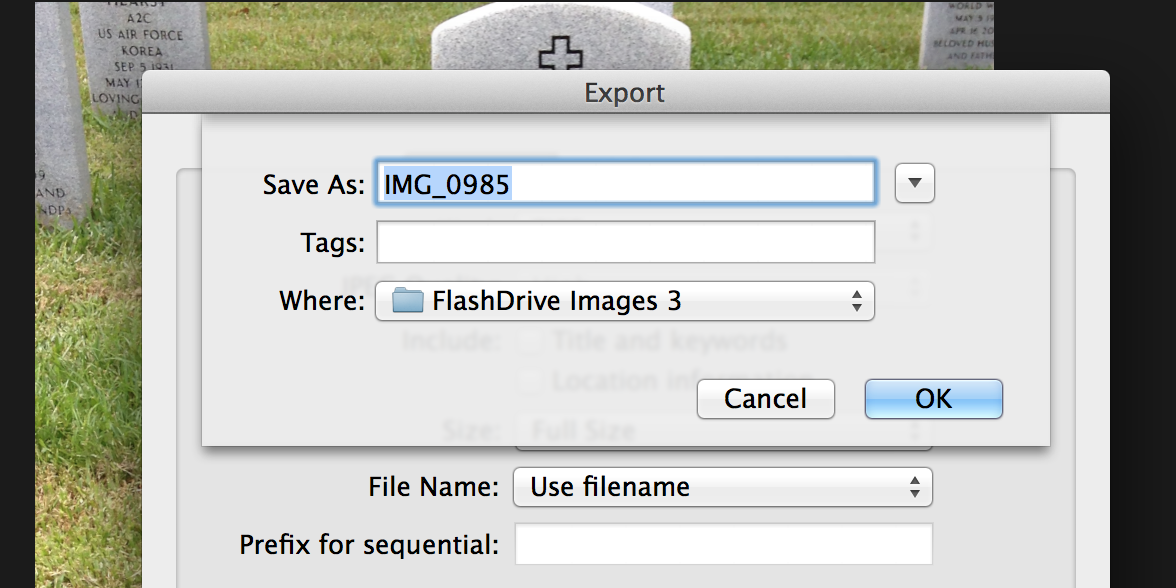 Finally It will say SAVE AS.... and you name the image you want to send and where it is going. Be careful here, because once you fill these in and click OK.... the images will be moved INSTANTLY.
SEE, I told you it wasn't that big a deal. And once you do it a couple of times it makes things so easy! Hope this helps. I'm not the biggest techie in the world but when I find something and it works I like to share it. I know that not everyone likes or uses iPhoto, but if you've thought about it, now might be a good time to give it a try!
Happy Researching!
Karen
I've always been a windows user, UNTIL about a year and a half ago my son introduced me to the world of MAC. I love my MAC. There was a bit of a learning curve, won't deny it. And I must say I'm still learning. The hardest thing for me was not having that photo editing software to work with. I'm a creature of habit, once I find something that works for me, I don't change it. Ever. Well toss that out the window. Being on this Mac I had to change my editing software. No choice.
So I sat down one day and went thru the video's at UTube until I found some on using iPhoto. Wow. If you get someone who really knows their stuff you can conquer about anything. So let me show you how I learned to work with my images in iPhoto!
First thing you have to do is figure out where you have the images you want to work on and then where you want them to go when you are done with them. Once you have that you've got it made. Now comes the fun part. So here we go! The captions UNDER each photo will explain the process for that screen.... READY?
Above - The screen that starts it all. Ignore the "Recent". Look at the pull down window. See where it says, IMPORT TO LIBRARY? Yeah that one. Click on it. When you do it opens .....
SEE, I told you it wasn't that big a deal. And once you do it a couple of times it makes things so easy! Hope this helps. I'm not the biggest techie in the world but when I find something and it works I like to share it. I know that not everyone likes or uses iPhoto, but if you've thought about it, now might be a good time to give it a try!
Happy Researching!
Karen
22 October 2014
Wedding Wednesday - Zehring & Gebhart

Fifty years ago, October 22, 1863, Lewis H. Zehring and Miss Elizabeth Gebhart, daughter of Emanuel Gebhart, were united in marriage by Rev. C. Albrecht. For a half century they have resided in Miamisburg, excepting a brief period, when they resided in the country near town.
Squire Zehring is one of the best known men in the county, and has always been active in the life of the community. For over thirty years he served as justice of the peace, and for over forty years has been a notary public. He served three years as county commissioner. He is still a director in the Mutal Building Association, in which he was secretary. For ten years he was mayor of Miamisburg, and is now a member of the Board of Education, and a cemetery trustee. Industrious, genial and faithful, Squire Zehring counts his friends by hundreds, and though past three score and ten, is still a young man in thought and action.
Handsome invitations have been issued to many friends for a reception at the Zehring home on Linden Avenue this afternoon and evening, when an opportunity will be afforded to extend congratulations and best wishes to the happy couple, who have enjoyed fifty years of life in unbroken wedlock.
Their two daughters, Dr. Blanche Zehring of Wells College New York, and Mrs. Laura Zehring Dosch of Elizabeth, N. J., are both at home visiting with their parents for the happy anniversary.
*Miamisburg (Ohio) News, Thursday, 23 OCT 1913, Front Page
20 October 2014
Monday Musings
Here we are yet another Monday! It was a busy weekend here. We drove about two hours or so north of here and went to the Bala (Canada) Cranberry festival. It was all about the tasty cranberry! And they did indeed have it all. One of the highlights of the Cranberry Festival was seeing the Canadian Golden Helmets perform. The Golden Helmets is a precision motorcycle group made up of officers from different towns here in the province of Ontario. You can read more on them and see a pic here. Be sure to click on the photo, they are a fine looking group. They did a great job and we totally enjoyed watching them. We brought some cranberries, so I'll be putting those to good use.
Mr. Brown Eyes did a bunch of census work on Sunday. He enjoys doing that and I'm not going to argue with him. I love the thrill of the hunt, chasing our ancestors down but truthfully typing in the census stuff just bores me tears. Somehow after talking to others who do genealogy I'm not alone. I love finding them, learning what they offer up in the census but somehow I just can't get into that typing stuff on it the way MBE can. Thankfully he enjoys it and doesn't mind.
Today, after the small amount of housework is done I'm hoping to get some more images cropped, named & linked. I've figured out how to do editing in iPhoto. I must say I love it! It's simple and does the job without tons of techincal difficulty.
Speaking this Friday night at the Brighton District Library (Michigan). So we are going back to the states for a few days. Will be good to hopefully see the grandkids, family & friends. How much can we squeeze into a weekend? Dunno but going to find out eh?
Happy Researching!
Karen
Mr. Brown Eyes did a bunch of census work on Sunday. He enjoys doing that and I'm not going to argue with him. I love the thrill of the hunt, chasing our ancestors down but truthfully typing in the census stuff just bores me tears. Somehow after talking to others who do genealogy I'm not alone. I love finding them, learning what they offer up in the census but somehow I just can't get into that typing stuff on it the way MBE can. Thankfully he enjoys it and doesn't mind.
Today, after the small amount of housework is done I'm hoping to get some more images cropped, named & linked. I've figured out how to do editing in iPhoto. I must say I love it! It's simple and does the job without tons of techincal difficulty.
Speaking this Friday night at the Brighton District Library (Michigan). So we are going back to the states for a few days. Will be good to hopefully see the grandkids, family & friends. How much can we squeeze into a weekend? Dunno but going to find out eh?
Happy Researching!
Karen
15 October 2014
Wedding Wednesday - Ansley & Lavender (1824)
Judge James Lavendar and Malinda Ansley were married 22 July 1824. Some sources show it to be Henry County, Georgia, others show it to be Warren County, Georgia.
Judge Lavendar was born 29 OCT 1802 in Spalding County, Georgia and died 20 JAN 1863.
Malinda Ansley was the daughter of Thomas Ansley (1767-1837) and his wife, Henrietta Ragland (1777-1837). She was born 8 JUN 1805 in Warren County, Georgia and died 23 August 1865 in Spalding County, Georgia.
The burial location for Judge James & Malinda Ansley Lavendar is currently unknown to me.
Judge Lavendar did leave behind a will** in which he does name his wife & children.

In his will he names children - Eliza T., William R., Mary B, Martha J., Carrie M., Griffin F., Melinda H., Adeline E., and Melvina M.
Judge Lavendar was born 29 OCT 1802 in Spalding County, Georgia and died 20 JAN 1863.
Malinda Ansley was the daughter of Thomas Ansley (1767-1837) and his wife, Henrietta Ragland (1777-1837). She was born 8 JUN 1805 in Warren County, Georgia and died 23 August 1865 in Spalding County, Georgia.
The burial location for Judge James & Malinda Ansley Lavendar is currently unknown to me.
Judge Lavendar did leave behind a will** in which he does name his wife & children.
In his will he names children - Eliza T., William R., Mary B, Martha J., Carrie M., Griffin F., Melinda H., Adeline E., and Melvina M.
- Elizabeth (1825-1906) marries John Thurman, 12 SEP 1860 Spalding County, Georgia
- William Robert (1826-1910) marries 13 DEC 1849 Fayette County, Georgia to Elizabeth Edmondson.
- Mary Belle (1828 - ?) marries 13 JAN 1848 Spalding County, Georgia to John A. Dunn (1828-1895)
- Martha Jane (1832-1898)
- Griffin F. (1839-1864)
- Carrie M. (1840 -?)
- Malinda H. (1840 -1916)
- Adeline "Addie" (1844-1880) marries 1863 to Henry B. Cox
- Melvina M. (1848-?)
- George Thomas (1830-1831) Not named in will, died as an infant.
14 October 2014
Lists - My Favorite Research List
Last week I did a series on feeling overwhelmed in your research. In that series I talked about my research lists and promised to share how I do them in Legacy. Warning this post is heavy in the images department so it might be slow to load if you are on a dial up connection.
First of all let me start by saying I don't like the report feature. I've never liked it, not even when I used other software. So I set out to find a way to get what I want in the easiest way possible. That's when I figured out that I could make the "search" feature work for me. I've used this for years, I love it and today I'm going to show you how I do it.
When you open Legacy you see the top of your screen which has your tool bar and the tabs across the top. We aren't going to deal with the tabs. Today's blog is about the tool bar. You will want MY TOOLBAR highlighted. Under that if you look to YOUR left of that you will see SEARCH.

Click on SEARCH and it will open the window you see below. Its not a complicated window so you should be able to see there are THREE conditions available to search by. You set the conditions based on what you are working on. You may or may not need all three conditions. Your choice. When I am going to an archive to work I usually use all three. You should take some time before you get into this to decide what you want to use this for and exactly what it is you are after. This is my favorite for archive & locality work. Helps me see where the holes are in that area.
 Once you figure out where you want to research then you can focus on the people that are there. You do this by filling in the "conditions. As you can see below there are three "conditions" available to use. I use "individual" and then continue on with birth place, Marriage place, death place or whatever conditions you want. After that you decide on where you are going to research. For this example I chose Montgomery County, Ohio. You type in what you want. Make sure that you fill this in exactly as you have it in your program or you get no where. It has to match. Once you've made your choices you will see at the bottom CREATE LIST. Click it.

The program is going to take a few seconds/minutes depending on how many people in the area you have. This Montgomery County list that I created has abt 280 pages. My family (maternal) has been in Montgomery County since the very early 1800's. When it has done its thing it will give you a screen much like the one below. It has your list on the left. On it is everyone who fit the "conditions" that you put in above. A very nice little list indeed! And so simple to get!

One little thing that greatly affects the length of your list is shown below. If you look directly below your list, you will see a small button, OPTIONS. The pull down window will open. Make sure that you unclick "include married names". It gives you many duplicates that I personally find totally uncalled for. To the right of that button is one that says print. Click on it.
 When you click on that PRINT button the screen below comes up. This is where you define how your report will be spaced. I keep it pretty simple, spread it across one page, one row. Very seldom do I see a need for two rows. If you look under the OPTIONS tab on the screen below this text you can see the options for headers and the name you want on the report.

Down in the far right corner you see the REPORT settings. I like using the PDF option as I can save it and have a copy just in case. Once you decide if you want pdf or whatever, you go back to the top right and click CREATE. You won't see the CREATE button unless you mark the pdf button. Once you hit create it will ask you what to name your file and where you want it saved to. Your choice on that one.
 The list will appear on your screen and a box will pop up asking if you want to view your pdf. If you say yes, then something like this will appear! My search list looks like this.... As you can see it gives me the persons name, id number, birth, death, spouse and marriage information. With this I can walk into any Archive and I know exactly what I am in need of. You can change those settings to reflect more or less information, depending on what it is you are in need of. As in any piece of software its only as good as you make it.
 So now you have it. My favorite list to use when I'm researching at an Archive or library. I've shown you how to do this in Legacy, but I'm sure that other pieces of software are capable of doing the same thing, it just take you a few tries to get it the way you want it. Although this post seems long and the process difficult, I can generate & print one of these in under four minutes (yes, I timed it!). Leaves me plenty of time to dress, grab my keys and be out the door and on my way to a great day of reseaching ANYWHERE very quickly. Hope it works for you!
Karen
First of all let me start by saying I don't like the report feature. I've never liked it, not even when I used other software. So I set out to find a way to get what I want in the easiest way possible. That's when I figured out that I could make the "search" feature work for me. I've used this for years, I love it and today I'm going to show you how I do it.
When you open Legacy you see the top of your screen which has your tool bar and the tabs across the top. We aren't going to deal with the tabs. Today's blog is about the tool bar. You will want MY TOOLBAR highlighted. Under that if you look to YOUR left of that you will see SEARCH.
Click on SEARCH and it will open the window you see below. Its not a complicated window so you should be able to see there are THREE conditions available to search by. You set the conditions based on what you are working on. You may or may not need all three conditions. Your choice. When I am going to an archive to work I usually use all three. You should take some time before you get into this to decide what you want to use this for and exactly what it is you are after. This is my favorite for archive & locality work. Helps me see where the holes are in that area.
The program is going to take a few seconds/minutes depending on how many people in the area you have. This Montgomery County list that I created has abt 280 pages. My family (maternal) has been in Montgomery County since the very early 1800's. When it has done its thing it will give you a screen much like the one below. It has your list on the left. On it is everyone who fit the "conditions" that you put in above. A very nice little list indeed! And so simple to get!
One little thing that greatly affects the length of your list is shown below. If you look directly below your list, you will see a small button, OPTIONS. The pull down window will open. Make sure that you unclick "include married names". It gives you many duplicates that I personally find totally uncalled for. To the right of that button is one that says print. Click on it.
Down in the far right corner you see the REPORT settings. I like using the PDF option as I can save it and have a copy just in case. Once you decide if you want pdf or whatever, you go back to the top right and click CREATE. You won't see the CREATE button unless you mark the pdf button. Once you hit create it will ask you what to name your file and where you want it saved to. Your choice on that one.
Karen
08 October 2014
Overwhelmed? Just Say NO!
You made it! You've gotten thru all the previous steps I posted on how to stop feeling overwhelmed both in your genealogy & in your personal life. I think I've saved the hardest one for last.
I'm not sure why saying "NO" is so difficult but for me, Its one of the hardest things to do. Don't know if its the not wanting to disappoint anyone or if I just hate letting people down. It's just difficult!
If there's an easy way to do this I don't know what it is. I can't give you a magic equation so my advice is to just do it. Just say it.
We are trained from childhood that "doing good" is important. We are "programmed" so to speak, to to be nice, help each other. And having to disappoint someone by saying no is hard. BUT, in order to keep us on even keel, to make sure we keep our priorities in line sometimes saying "no" is just something we have to do. There's that priority thing again. Figuring out what matters, what we want to focus on.
Some thoughts to help -
Hope this helps someone. I'm not a shrink or anything but this whole process helped me tremendously. Hope it does the same for you!
Happy Researching!
I'm not sure why saying "NO" is so difficult but for me, Its one of the hardest things to do. Don't know if its the not wanting to disappoint anyone or if I just hate letting people down. It's just difficult!
If there's an easy way to do this I don't know what it is. I can't give you a magic equation so my advice is to just do it. Just say it.
We are trained from childhood that "doing good" is important. We are "programmed" so to speak, to to be nice, help each other. And having to disappoint someone by saying no is hard. BUT, in order to keep us on even keel, to make sure we keep our priorities in line sometimes saying "no" is just something we have to do. There's that priority thing again. Figuring out what matters, what we want to focus on.
Some thoughts to help -
- Be Selective! You don't have to say "yes" to everything that comes along. Seriously, if we spend all our time focusing on things that don't matter to us, we get burned out and have no time for the things that do matter. Step back and figure out exactly what really matters then focus there.
- Do The Math! Seriously, take a good hard look at your life. THEN make the choices based on what you know. If you want to spend (INSERT YOUR NUMBER HERE) hours a week on genealogy, and you need (INSERT YOUR NUMBER HERE) hours a week for cleaning, transporting children, and (INSERT YOUR NUMBER HERE) on other "family" things, can you really afford to donate 20 hours a week to volunteer at the animal shelter? Before you say yes, organize your priorities, the things that matter and see what you have available. Then prioritize how you want to spend it. I volunteer for an organization at Ford. When the call comes out each month for workers, I stop, look at what I have going on, what my other commitments are and what time I have available and then (AND ONLY THEN) do I commit.
- Don't be Compulsive! Don't rush in. Just because they ask now doesn't mean you have to answer now. Be honest - "Gee, I'd love to help, but can I get back to you after I check my schedule?". If they truly want your help they will understand. Take the time and step back, check your priority schedule and then make your decision. Be especially wary of making decisions when you are tired or stressed. I've found when I just cave in and commit because I'm tired or because everyone else around me said yes, I always regret it.
- Be Honest! It's always better to be honest up front. It's not always the easiest way to go, BUT in the long run it's better for your relationships if you just say it right up front. "I just don't have the time to commit to anything else right now.", is far better than committing then finding out the next morning that this really wasn't something you wanted to do and have to cancel. In the long run (hopefully) it will be better for both parties that you were honest and upfront about it.
- Be Flexible! Sometimes no matter how hard we try things come up and BAM! our little list making, prioritized life has to bend. Whether it's grandkids, kids or just a neighbor in need, we are a persons last hope for that hour of assistance that they desperately need. Emergencies happen, cars break down, power goes out, or someone needs a ride. Yes, those things do happen, its called life. It's important to step back and understand that we don't have total control. Things happen its called life. Be flexible enough that if you get a call and someone needs you to stop and help for an hour its not the end of the world. You will recover and move on. Remember, one day it might be you on the "needy" end of that phone call.
Hope this helps someone. I'm not a shrink or anything but this whole process helped me tremendously. Hope it does the same for you!
Happy Researching!
07 October 2014
Overwhelmed? Make Lists!
Step #4 of my five steps to help ease the feeling of overwhelmed was Make Lists! I'm a list maker. Always have been and I'm sure I always will be. Mr. Brown Eyes (my spouse) tells me that I have a ticker tape list running across my forehead the minute my feet hit the floor in the morning.
I'm not sure its quite that bad, but he is correct. When I hit the shower in the morning I pretty much know what my day is going to be like. I know what needs to be done, I know what I want to do and most of the time, baring any emergencies or such I pretty much get 'er done.
As I said before alot of this boils down to priorities. Its really pretty simple. What is important to you and how badly do you want to take care of those things?
My first list of the day is what do I need to get done as far as our home goes? Do I need to toss in laundry? Take out something for dinner? Put something in the crockpot? Do the bird feeders need filling? Are there any projects that I need to take care of? I have a pretty standard routine that takes place for cleaning, it's primarily a Monday morning thing. There's a list - Laundry gets started, dinner goes in the crockpot, dusting is done, usually the house cleaning is complete on Monday's by noon. There are several good sites with lists that can help with that. One that is very popular is the FlyLady site. She has lots of helpful ideas on getting your house in order & organized. Another is the Martha Stewart website. The link I provided links to her "lists", cleaning, organizing and more. Worth taking a look at if you are challenged in that area.
Once that is done then we look at genealogy. I've always got one major project going on in my office. I've currently got two major lists I'm working on. One is my "Michigan Research" list and the other is my "Medina County Ohio Research" list. Both of these are generated by my software. Another list that I like to generate from my software are "database" search lists. Not difficult to do, but oh so helpful. I will be doing a follow up post on generating those lists shortly. Those lists show me where my "holes" are and what I need to be looking for. We all have those holes in our research.
I also keep to do lists for ALL my favorite genie haunts. Those include Library of Michigan, Allen County (Ft Wayne), Indiana, Montgomery County Record Center & Archives (Dayton, Ohio), Medina County, Ohio public Library. Each repository that I have plans to visit has a to do list - some are obit search lists, some are vital record wants, some are major lists with books, microfilms and more on them. The lists include call numbers, newspaper names and details of what I want and why. Easily customized for all needs. I keep those in Evernote. Always accessible and available for spur of the minute "honey want to run off & research weekends?". Prepared? You better believe it!
Lists are just so important. Both in our genealogy and our personal lives. I've got my Christmas lists going already. Not what I want, but what do I have for each of my grandsons and kids. Can't really go into detail here because I do know my kids read this. I've got a little notebook sorta thingy that has a space for each person I shop for. I have written down the "gee, I could use that" stuff that I hear during the year, then as I find it it gets taken of that list and gets added to the BOUGHT list. So far no one has ever found that list. Comes in handy when you go out shopping and come back as to what goes to what grandson. I use my iPad for my grocery lists. Its great, it shows up on all devices so there's never a chance I don't have my list with me.
I try really hard not to make lots of paper lists but sometimes hard as I try I end up with post its on my desk for genealogy stuff I want to remember, for reminders, for blog topics that I want to write about (I've got one going right here next to my laptop now).
In short, you need to find a way to make lists that work for you. If its paper, if its electronic that works too. The main thing is that using lists helps keep you focused. Keeps you on track. I'm a visual person. Seeing it in front of me, whether on paper or on the iPad or in Evernote keeps me on track. With my list I can see my goals and where I stand. If I have a list of 12 things to do and my goal is done by noon, there's still four to go and its 11:15- I better get off the phone and finish that list. Yep, keeps me on track.
Are you a list maker? If not, maybe you should try it! Sure helps me!
I'm not sure its quite that bad, but he is correct. When I hit the shower in the morning I pretty much know what my day is going to be like. I know what needs to be done, I know what I want to do and most of the time, baring any emergencies or such I pretty much get 'er done.
As I said before alot of this boils down to priorities. Its really pretty simple. What is important to you and how badly do you want to take care of those things?
My first list of the day is what do I need to get done as far as our home goes? Do I need to toss in laundry? Take out something for dinner? Put something in the crockpot? Do the bird feeders need filling? Are there any projects that I need to take care of? I have a pretty standard routine that takes place for cleaning, it's primarily a Monday morning thing. There's a list - Laundry gets started, dinner goes in the crockpot, dusting is done, usually the house cleaning is complete on Monday's by noon. There are several good sites with lists that can help with that. One that is very popular is the FlyLady site. She has lots of helpful ideas on getting your house in order & organized. Another is the Martha Stewart website. The link I provided links to her "lists", cleaning, organizing and more. Worth taking a look at if you are challenged in that area.
Once that is done then we look at genealogy. I've always got one major project going on in my office. I've currently got two major lists I'm working on. One is my "Michigan Research" list and the other is my "Medina County Ohio Research" list. Both of these are generated by my software. Another list that I like to generate from my software are "database" search lists. Not difficult to do, but oh so helpful. I will be doing a follow up post on generating those lists shortly. Those lists show me where my "holes" are and what I need to be looking for. We all have those holes in our research.
I also keep to do lists for ALL my favorite genie haunts. Those include Library of Michigan, Allen County (Ft Wayne), Indiana, Montgomery County Record Center & Archives (Dayton, Ohio), Medina County, Ohio public Library. Each repository that I have plans to visit has a to do list - some are obit search lists, some are vital record wants, some are major lists with books, microfilms and more on them. The lists include call numbers, newspaper names and details of what I want and why. Easily customized for all needs. I keep those in Evernote. Always accessible and available for spur of the minute "honey want to run off & research weekends?". Prepared? You better believe it!
Lists are just so important. Both in our genealogy and our personal lives. I've got my Christmas lists going already. Not what I want, but what do I have for each of my grandsons and kids. Can't really go into detail here because I do know my kids read this. I've got a little notebook sorta thingy that has a space for each person I shop for. I have written down the "gee, I could use that" stuff that I hear during the year, then as I find it it gets taken of that list and gets added to the BOUGHT list. So far no one has ever found that list. Comes in handy when you go out shopping and come back as to what goes to what grandson. I use my iPad for my grocery lists. Its great, it shows up on all devices so there's never a chance I don't have my list with me.
I try really hard not to make lots of paper lists but sometimes hard as I try I end up with post its on my desk for genealogy stuff I want to remember, for reminders, for blog topics that I want to write about (I've got one going right here next to my laptop now).
In short, you need to find a way to make lists that work for you. If its paper, if its electronic that works too. The main thing is that using lists helps keep you focused. Keeps you on track. I'm a visual person. Seeing it in front of me, whether on paper or on the iPad or in Evernote keeps me on track. With my list I can see my goals and where I stand. If I have a list of 12 things to do and my goal is done by noon, there's still four to go and its 11:15- I better get off the phone and finish that list. Yep, keeps me on track.
Are you a list maker? If not, maybe you should try it! Sure helps me!
06 October 2014
Monday Musings
WOWSERS! Last week just flew by! I've got two more days on my series on how to not feel overwhelmed - both in genealogy and in your daily life. We still have "Make Lists" & "Say NO" to cover.
Last week was a good one, I got tons of stuff typed and edited and ready to be added to my data base. I'm working on a number of projects, which is really nothing new. Its just good to finally see it linked and added to the data base.
The youngest grandson decided to just stand up in the middle of his parents kitchen floor this past Saturday and start walking! I had just crossed over the border back into the states when the video popped up on my phone. So excited to watch that! Soon he'll be up and running with the other grandsons! They grow up so fast!
On the way home from our temp location in Burlington, Canada we stopped in a small place to eat. Nothing big, nothing fancy, but the place just stayed busy all the time we were there. Looking around I stumbled on a chalkboard drawing with some holly on it. In the middle of all the holly and stuff were the following words - 12 FRIDAYS TILL CHRISTMAS!
Happy Researching!
Karen
Last week was a good one, I got tons of stuff typed and edited and ready to be added to my data base. I'm working on a number of projects, which is really nothing new. Its just good to finally see it linked and added to the data base.
The youngest grandson decided to just stand up in the middle of his parents kitchen floor this past Saturday and start walking! I had just crossed over the border back into the states when the video popped up on my phone. So excited to watch that! Soon he'll be up and running with the other grandsons! They grow up so fast!
On the way home from our temp location in Burlington, Canada we stopped in a small place to eat. Nothing big, nothing fancy, but the place just stayed busy all the time we were there. Looking around I stumbled on a chalkboard drawing with some holly on it. In the middle of all the holly and stuff were the following words - 12 FRIDAYS TILL CHRISTMAS!
WHAT!?!?!?!?
Needless to say I was about blown off my chair. It can't be. Not that soon! Alas I'm afraid tis true.
Oh well, where has the year gone! I'm back to my typing blogs! Don't forget to watch for the last two blogs in the Overwhelmed series!Happy Researching!
Karen
03 October 2014
Overwhelmed? Let's Simplify!
I'm constantly amazed at how some people can take something that is basically a simple task and make it difficult. Granted there are some things that you really need to do in a certain way, and changing that way could change the outcome of the whole project. There are exceptions to every rule BUT.... 99% of the time things can be simplified for the best.
Sometimes you have to step back and think about how you want to go about it, but once you get it life suddenly gets much better.
Some ways to simplify your life....
How do YOU simplify?
Sometimes you have to step back and think about how you want to go about it, but once you get it life suddenly gets much better.
Some ways to simplify your life....
- Plan your meals in advance, write them down on a calendar so there's no last minute dash to the land of frozen blobs called a freezer. It really does help relieve the "Oh my goodness its 5pm and I've done nothing about dinner" panic that you get when you've been sitting doing genealogy all day.
- Use your crockpot. Its not rocket science (if you need recipes contact me, I've got several thousand crockpot recipes I can share), use your imagination, you'd be surprised how much you can research knowing that dinner is almost made with very little effort on your part.
- Believe it or not, you do not have to be "connected" to the phone every waking, breathing moment of your life. Put it on vibrate. Trust me, the FB posts will wait. You've got voice mail. You don't have to take every call.
- Turn off the TV. Goodness, ever hear garbage in garbage out? When was the last time the tv did your dishes or washed your clothes. Save your tv time for something you REALLY want to watch - like maybe Who Do You Think You Are or something like that. Do you really care who's view they are talking about on The View? Seriously?
- Taking time to get up out of your chair is good for you, it also allows you to get things done. Seriously. Toss in a load of laundry. Set a timer. Go upstairs and work. Timer goes off. Move clothes to dryer. Set timer. Go upstairs and research. Timer goes off. Fold Clothes & put away. How is that hard? Certainly manageable by anyone reading this blog I'm sure.
- I know this one isn't for everyone BUT, I have to toss it here because it truly simplifies things for me. I asked for and received from my son, a robot vacuum. I know that people are skeptics but it works for me. Lets face it, how many people vacuum under the bed, the couch and other hard to get to places every week? My vacuum is programmed for every Monday morning and it works. Maybe savings? Maybe a group gift from all your kids? Either way it simplifies things for me.
- Organize all your errands on ONE day a week. I do all my errands on Tuesday's. Its also MY DAY. I do no housework other than making our bed. I do what makes me happy that one day a week. If there are no errands to run I know I can sit here in my office and do this FOR ME. Usually I run my errands, go to lunch with friends or family, and then work on my computer (I take my laptop with me) while I wait for my Tuesday night hang out with friends to begin.
How do YOU simplify?
02 October 2014
Overwhelmed? Let's Talk Organization!
Organization is a major issue for a lot of people. I'm not exception. I'm working very hard at organizing some things in my life, but I can tell you right now, it's not easy.
Organization covers alot of ground. It applies to lots of different aspects of our lives. Things that we need to organize in order not to feel overwhelmed can include all sorts of things - for example -
Last year I went thru all my closets (except Mr. Brown Eye's). One closet a week. All items taken out, gone thru. Some stuff donated, some stuff moved to another location, some stuff just tossed in trash. Deciding what I needed, what I didn't was a major chore. But I did it. It's not just about our household organization but our genealogy space organization. So I also did my office closet and desk.
Whether you have a room you call an office or whether you have a corner desk in the living room for your genealogy, organization is a major issue. There is nothing worse, at least to me, to go to a major repository to research, make a MAJOR find, go to type it in your computer data base only to discover its ALREADY THERE!!!!!!!!! And I know that you've done that. We all have. Because we haven't taken the time to stop digging long enough to dig ourselves out of the mess & clutter we call our "office" or "genealogy desk". If we stopped researching, just for a week or two, and took the time to get rid of the piles of papers, the clutter, the mass of disorganization, what a difference it would make in your productivity. Yes, I know its hard!
Just think if your desk wasn't covered in piles of paper you could have a list of exactly what you want to search for. Then when you have 15 minutes to sit down and research, you'll know exactly what you want to look and where! It would make such a difference in how you see things. With a decluttered desk you won't feel so overwhelmed.
There is a Facebook page for genealogy organization, "The Organized Genealogist". It is a closed group, meaning you will have to ask to be included. Keep in mind that reading all the posts can be very overwhelming. But there is alot there, with the focus being on organizing your genealogy. No genealogy surnames or such allowed. Great group.
So what will you take time to organize this week? Have you recently reorganized your genealogy space? Do you wish you had done it sooner?
Organization covers alot of ground. It applies to lots of different aspects of our lives. Things that we need to organize in order not to feel overwhelmed can include all sorts of things - for example -
- Kitchen
- Closets
- Daily Chores
- Computer Files
- Garage
- Collections (in my case my cookbook collection)
- Offices
Last year I went thru all my closets (except Mr. Brown Eye's). One closet a week. All items taken out, gone thru. Some stuff donated, some stuff moved to another location, some stuff just tossed in trash. Deciding what I needed, what I didn't was a major chore. But I did it. It's not just about our household organization but our genealogy space organization. So I also did my office closet and desk.
Whether you have a room you call an office or whether you have a corner desk in the living room for your genealogy, organization is a major issue. There is nothing worse, at least to me, to go to a major repository to research, make a MAJOR find, go to type it in your computer data base only to discover its ALREADY THERE!!!!!!!!! And I know that you've done that. We all have. Because we haven't taken the time to stop digging long enough to dig ourselves out of the mess & clutter we call our "office" or "genealogy desk". If we stopped researching, just for a week or two, and took the time to get rid of the piles of papers, the clutter, the mass of disorganization, what a difference it would make in your productivity. Yes, I know its hard!
Just think if your desk wasn't covered in piles of paper you could have a list of exactly what you want to search for. Then when you have 15 minutes to sit down and research, you'll know exactly what you want to look and where! It would make such a difference in how you see things. With a decluttered desk you won't feel so overwhelmed.
There is a Facebook page for genealogy organization, "The Organized Genealogist". It is a closed group, meaning you will have to ask to be included. Keep in mind that reading all the posts can be very overwhelming. But there is alot there, with the focus being on organizing your genealogy. No genealogy surnames or such allowed. Great group.
So what will you take time to organize this week? Have you recently reorganized your genealogy space? Do you wish you had done it sooner?
01 October 2014
Wedding Wednesday - Elopement!

Hopkinsville Kentuckian, Pg. 12 SEP 1908, Pg. 5
Madisonville Soldier
Captures A Trigg County Bride
Captures A Trigg County Bride
Another romance has resulted from the stationing of troups in Trigg County. Two or three months ago, a Middlesboro Soldier married a pretty girl at Golden Pond. Amos Winstead, a Madisonville soldier, lately on duty at Cerulean, is the next of the military boys to capture a Trigg County bride. On Sept. 2 he eloped with Miss Sarah Nabb, a pretty daughter of C.T. Nabb, and they were married in Nashville. Parental objections made the elopement necessary. The couple met first a year ago, while the bride was a schoolgirl at Georgetown.
The Cadiz Record says the groom is an electrician in Madisonville, and is said to be a splendid young man and of a good family. He has been given a discharge from the State Guard and is now out of the military service.
The Bride is a very beautiful girl of sixteen and very popular.
30 September 2014
Overwhelmed? Let's Talk Priorities!
In Monday's post on feeling overwhelmed, my number #1 to help decrease that way of feeling overwhelmed was to prioritize. Often when you are overwhelmed just figuring out where to start is difficult. So I'm going to offer some suggestions - elaborate on just how to do the things I suggested.
The first thing I suggested was to PRIORITIZE your life. For me it wasn't that hard, I already knew what my priorities were. I just needed to see them again. Remind MYSELF of what they were. We get so caught up in just being alive that we sometimes let things get out of hand.
So I sat down and made a list of just what matters to me. Your list may change as things change in your life. The list of a retiree will probably be different than that of a new mom or a mom with small children.
I won't put my whole list up here but an example of my list would be:
Second on the list was OUR home. No, OUR home is not all my responsibility, but I take great pride in taking care of our home. I am a homebody, I love being here at home, surrounded by the photo's and things that make this house our home. And I like it kept a certain way. That's important to me. So I make a window of time each day available for its upkeep. I'm primarily an early bird so I'm up getting Mr Brown Eyes off to work. While I'm up and he's headed out, I plan dinner, toss in laundry, straighten up, make the bed and I'm done with housework and usually in my office by 8:30. In the summer it might be later because I enjoy weeding and doing gardening when its cooler outside.
Third, fourth and fifth - the genealogy, gardening and reading really are flexible to me. Alot depends on other factors. If its going to be a beautiful day outside I might take my laptop and work on the patio, with breaks from typing to pull some weeds. The only two items on that list that are locked in stone are #1 & #2.
It ALL boils down to PRIORITIES. It really is that simple. So what are your priorities? Have you made your list? What makes your list?
The first thing I suggested was to PRIORITIZE your life. For me it wasn't that hard, I already knew what my priorities were. I just needed to see them again. Remind MYSELF of what they were. We get so caught up in just being alive that we sometimes let things get out of hand.
So I sat down and made a list of just what matters to me. Your list may change as things change in your life. The list of a retiree will probably be different than that of a new mom or a mom with small children.
I won't put my whole list up here but an example of my list would be:
- My family - includes husband, children & grandchildren
- Our home
- Genealogy
- Gardening
- Reading
Second on the list was OUR home. No, OUR home is not all my responsibility, but I take great pride in taking care of our home. I am a homebody, I love being here at home, surrounded by the photo's and things that make this house our home. And I like it kept a certain way. That's important to me. So I make a window of time each day available for its upkeep. I'm primarily an early bird so I'm up getting Mr Brown Eyes off to work. While I'm up and he's headed out, I plan dinner, toss in laundry, straighten up, make the bed and I'm done with housework and usually in my office by 8:30. In the summer it might be later because I enjoy weeding and doing gardening when its cooler outside.
Third, fourth and fifth - the genealogy, gardening and reading really are flexible to me. Alot depends on other factors. If its going to be a beautiful day outside I might take my laptop and work on the patio, with breaks from typing to pull some weeds. The only two items on that list that are locked in stone are #1 & #2.
It ALL boils down to PRIORITIES. It really is that simple. So what are your priorities? Have you made your list? What makes your list?
29 September 2014
Overwhelmed? Here's Five Steps To Help!
Do you ever feel overwhelmed by the amount of genealogy information being "thrown" at you these days? A sense of being totally overwhelmed by the "information highway"? It seems like everyday there is some new technology, something new to search, something new to try, a new website, a new genealogy Facebook page, you want to look at them all but you've got kids to take care of, the laundry calls, someone has to make dinner and the list seems to just keep growing on both the personal and the genealogy sides?
I know how you feel! It can be tough. But I've learned some things so I thought I'd share them with you. This is how I survive, can't swear it will work for you but some suggestions that might help.
I know how you feel! It can be tough. But I've learned some things so I thought I'd share them with you. This is how I survive, can't swear it will work for you but some suggestions that might help.
- Priorities - Sit down, step back and take a hard look at just what it is that is truly important to you. Yes, I know you really want to find out who the parents of John Smith are. We all do. But the fact is, he's been dead for over 200 years. He can wait. Stop and take a good look at what really matters. Then plan your time around those things.
- Organize - You would be amazed at how much easier life is when you organize your life. Not just your genealogy but your day to day life as well. I didn't say it was easy or that it would happen over night, but it can be done. By having things organized, you can quickly get things done without spending half the time you wanted to use researching or doing household chores looking for things to help get the job done. Make a place for everything and put everything in its place.
- Simplify - Again it really makes like easier if you learn to simplify things. I enjoy cooking and baking as one of my "other" hobbies. I sometimes see really great recipes with tons of ingredients and steps to making them. Reading over the process I usually find a way to side step alot of the process and still get the same results. There are alot of things that you can do to simplify things. In genealogy, when doing some internet searches I search using ONE group sheet. Yep, just one family and search only for that family. No rabbit hole running.
- Make Lists - Not just in your genealogy but in your daily life. Sit down and make a list of the chores that you need to take care of. Sometimes by multitasking & dividing you can shorten the time it takes to get the job done. By making a list you can see what chores are the most time consuming and perhaps do one per day, combined with several smaller chores each day. Everything gets done and you win with more time for doing the things you want to do instead of what you have to do.
- Learn to say NO - Being a stay at home mom for all of our marriage meant that I was one of those who got asked to do EVERYTHING. You know, you are at home watching soaps and eating bon bons so of course you have time to be on every committee and do everything right? I learned early on that if I accepted everything that I was asked to do I quickly had no time to do the things I needed/wanted to do at home. So I stepped back, decided which things were the most important for me to do at school to support the activities I felt important and then adjusted my time to fit that in. Everything else was "Sorry, I'd love to help but I'm already volunteering on several other projects."
Subscribe to:
Posts (Atom)